

開發(fā)者可以使用云開發(fā)開發(fā)微信小程序、小游戲,無需搭建服務(wù)器,即可使用云端能力。
云開發(fā)為開發(fā)者提供完整的云端支持,弱化后端和運維概念,無需搭建服務(wù)器,使用平臺提供的 API 進行核心業(yè)務(wù)開發(fā),即可實現(xiàn)快速上線和迭代,同時這一能力,同開發(fā)者已經(jīng)使用的云服務(wù)相互兼容,并不互斥。
目前提供三大基礎(chǔ)能力支持:
1、云函數(shù):在云端運行的代碼,微信私有協(xié)議天然鑒權(quán),開發(fā)者只需編寫自身業(yè)務(wù)邏輯代碼
2、數(shù)據(jù)庫:一個既可在小程序前端操作,也能在云函數(shù)中讀寫的 JSON 數(shù)據(jù)庫
3、存儲:在小程序前端直接上傳/下載云端文件,在云開發(fā)控制臺可視化管理
具體的可以去小程序文檔上查看,下面用一個登錄注冊的案例來演示小程序云開發(fā)數(shù)據(jù)庫的運用
注冊
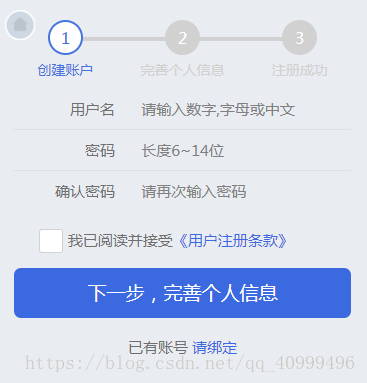
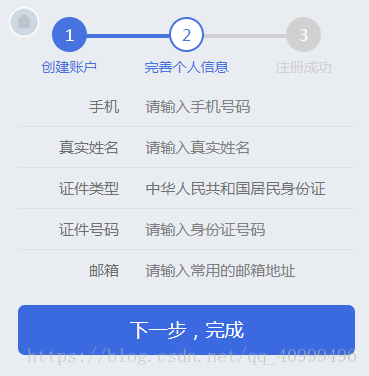
在創(chuàng)建的時候,要在點下一步的時候,調(diào)數(shù)據(jù)庫來看用戶名有沒有重復(fù)的。在點擊同意的時候來調(diào)用數(shù)據(jù)庫,然后把所有的判斷放到下一步來判斷。所有條件都滿足就將用戶名和密碼放到全局變量中。
1 2 3 4 5 6 7 8 9 10 11 12 13 14 15 16 17 18 19 20 21 22 23 24 25 26 27 28 29 30 31 32 33 34 35 36 37 38 39 40 41 42 43 44 45 46 47 48 49 50 51 52 53 54 55 56 57 58 59 60 61 62 63 64 65 66 67 68 69 70 71 72 73 74 75 76 77 78 79 80 81 82 83 84 85 86 87 88 89 90 91 92 93 94 95 96 97 98 99 100 101 102 103 104 105 106 107 108 109 110 111 112 113 114 115 116 117 118 119 120 121 122 123 124 125 126 127 128 129 130 131 132 133 134 135 136 137 138 139 140 141 | var app = getApp();Page({ data: { userName: '', userPassword: '', userPasswordAgain: '', checkbox: false, repetition: false }, // 返回主頁面 backHomeTap: function() { wx.switchTab({ url: '../index/index', }) }, // 綁定 bindingTap: function () { wx.redirectTo({ url: '../login/login', }) }, // 用戶名 userNameInput: function(e) { this.setData({ userName: e.detail.value }); }, // 密碼 userPasswordInput: function(e) { this.setData({ userPassword: e.detail.value }); }, // 再次輸入密碼 userPasswordAgainInput: function(e) { this.setData({ userPasswordAgain: e.detail.value }); }, // 同意 checkboxChange: function() { if (this.data.checkbox ===
false)
{ this.setData({ checkbox: true }) } else { this.setData({ checkbox: false }) } var that = this; var userName = this.data.userName; // 初始化云 wx.cloud.init({ env: 'wubaib-9543f7', traceUser: true }); // 初始化數(shù)據(jù)庫 const db = wx.cloud.database(); const _ = db.command; db.collection('userInformation').where({ userName: _.eq(userName) }).get({ success: function (res) { if (res.data.length === 1)
{ that.setData({ repetition: true }) } } }) }, // 下一步,完善個人信息 perfectInforTap: function() { var userName = this.data.userName; var userPassword = this.data.userPassword; var checkbox = this.data.checkbox; var userPasswordAgain =
this.data.userPasswordAgain; var name =
/^[A-Za-z0-9\u4e00-\u9fa5]+$/; var repetition = this.data.repetition; if (userName === '') { wx.showToast({ title: '請輸入用戶名', icon: 'none', duration: 2000, mask: true }) } else if (!name.test(userName))
{ wx.showToast({ title: '用戶名格式不正確', icon: 'none', duration: 2000, mask: true }) } else if (repetition === true) { wx.showToast({ title: '用戶名已存在', icon: 'none', duration: 2000, mask: true }) } else if (userPassword ===
'') { wx.showToast({ title: '請輸入密碼', icon: 'none', duration: 2000, mask: true }) } else if (userPassword.length < 6)
{ wx.showToast({ title: '密碼最少6位', icon: 'none', duration: 2000, mask: true }) } else if (userPassword !==
userPasswordAgain) { wx.showToast({ title: '兩次密碼輸入不一致', icon: 'none', duration: 2000, mask: true }) } else if (checkbox === false) { wx.showToast({ title: '請選中已閱讀', icon: 'none', duration: 2000, mask: true }) } else { wx.redirectTo({ url: 'perfectInfor/perfectInfor', }) // 保存用戶名和密碼 app.appData.account =
{ userName:
userName, userPassword:
userPassword } } }}) |
在完善信息的時候獲取所有的變量(用戶名和密碼也在內(nèi)),然后在點擊下一步完成按鈕將數(shù)據(jù)上傳到數(shù)據(jù)庫。
1 2 3 4 5 6 7 8 9 10 11 12 13 14 15 16 17 18 19 20 21 22 23 24 25 26 27 28 29 30 31 32 33 34 35 36 37 38 39 40 41 42 43 44 45 46 47 48 49 50 51 52 53 54 55 56 57 58 59 60 61 62 63 64 65 66 67 68 69 70 71 72 73 74 75 76 77 78 79 80 81 82 83 84 85 86 87 88 89 90 91 92 93 94 95 96 97 98 99 100 101 102 103 104 105 106 107 108 109 110 111 112 113 114 115 116 117 118 119 120 121 122 123 124 125 126 127 128 129 130 131 132 133 134 135 136 137 138 139 | var app =
getApp();Page({ data: { userName: '', userPassword: '', phone: '', realName: '', card: '', email: '', }, // 返回主界面 backHomeTap: function() { wx.switchTab({ url: '../../index/index', }) }, // 手機號 phoneInput: function(e) { this.setData({ phone: e.detail.value }); }, // 真實姓名 nameInput: function(e) { this.setData({ realName: e.detail.value }); }, // 身份證 cardInput: function(e) { this.setData({ card: e.detail.value }) }, // email emailInput: function(e) { this.setData({ email: e.detail.value }) }, // 下一步完成 registerSuccessTap: function() { var phone = this.data.phone; var realName = this.data.realName; var card = this.data.card; var email = this.data.email; var userName = this.data.userName; var userPassword = this.data.userPassword; var phonereg =
/^1[345789]\d{9}$/; var namereg =
/^[\u4E00-\u9FA5]+$/; var cardreg =
/^\d{6}(18|19|20)?\d{2}(0[1-9]|1[012])(0[1-9]|[12]\d|3[01])\d{3}(\d|[xX])$/; var emailreg =
/^(\w)+(\.\w+)*@(\w)+((\.\w+)+)$/; var that = this; if (phone === '') { wx.showToast({ title: '請輸入手機號', icon: 'none', duration: 2000, mask: true }); } else if (!phonereg.test(phone))
{ wx.showToast({ title: '請輸入正確的手機號', icon: 'none', duration: 2000, mask: true }) } else if (!namereg.test(realName))
{ wx.showToast({ title: '請輸入正確的名字', icon: 'none', duration: 2000, mask: true }) } else if (card === '') { wx.showToast({ title: '請輸入身份證', icon: 'none', duration: 2000, mask: true }) } else if (!cardreg.test(card))
{ wx.showToast({ title: '請輸入正確的身份證', icon: 'none', duration: 2000, mask: true }) } else if (email === '') { wx.showToast({ title: '請輸入郵箱', icon: 'none', duration: 2000, mask: true }) } else if (!emailreg.test(email))
{ wx.showToast({ title: '請輸入正確的郵箱', icon: 'none', duration: 2000, mask: true }) } else { // 初始化云 wx.cloud.init({ env: 'wubaib-9543f7', traceUser: true }); // 初始化數(shù)據(jù)庫 const db =
wx.cloud.database(); db.collection('userInformation').add({ // data 字段表示需新增的 JSON
數(shù)據(jù) data: { realName:
realName, userName:
userName, userPassword:
userPassword, phone: phone, email: email, card: card }, success: function(res) { // res 是一個對象,其中有 _id
字段標(biāo)記剛創(chuàng)建的記錄的 id console.log(res); console.log(res.errMsg); } }) } }, /** * 生命周期函數(shù)--監(jiān)聽頁面顯示 */ onShow: function() { this.setData({ userName:
app.appData.account.userName, userPassword:
app.appData.account.userPassword }) },}) |
登錄
在登錄頁面,先獲取用戶輸入的用戶名和密碼。在點擊登錄的時候,先根據(jù)userName調(diào)數(shù)據(jù)庫的密碼和用戶輸入的密碼是否相等。如果相等將用戶的信息保存到全局變量中。
1 2 3 4 5 6 7 8 9 10 11 12 13 14 15 16 17 18 19 20 21 22 23 24 25 26 27 28 29 |